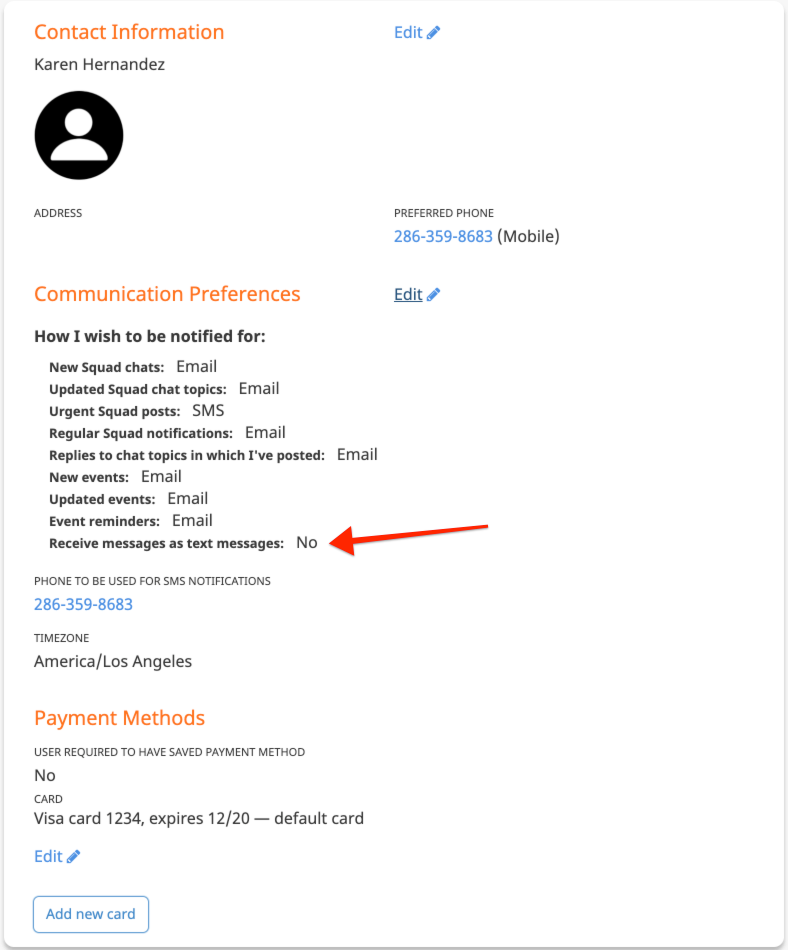
You can receive emails and text messages. Some are automatic notifications while others are messages sent by other users via the website or app.
Note: not all websites support text messages. If you do not see the text message references below on your account, your organization has chosen not to enable texting.
You can set your preferred notification format for different sorts of automatic notifications. Go to your Account Settings, located under your user avatar in the upper right.

Use the Edit button next to Contact Information to update your email address and mobile phone number.
The email address in Contact Information is also the email address you use to sign into the website. In other words, if you change it here, the next time you sign in, you will have to use the new email address.
Use the Edit button next to Communication Preferences to update how you receive most system notifications and also whether peopler allowed to send you text messages.
For most automatic notification types, you can opt to receive Email and/or SMS (text message). This includes opting out of a particular type of notification altogether. If you wish to do that, leave both checkboxes for it empty.
Squad Chat Notifications
There are several types of notifications associated with squad chats. They all have to do with the squads to which you are connected.
- You may be assigned directly as a coach or some other role.
- You may be a participant on the squad's roster.
- You may be linked to a participant on the roster. For instance, you may be a parent whose child is on the roster.
If a chat topic is marked as "Important" this results in an Urgent Squad post notification. In this way, you can choose to receive emails for regular posts and text messages for important posts.
Notes:
- On your website, squads, coaches, and participants might be called something else.
- Not everyone has access to mark chat topics Important, or event to post new topics. Those options are defined by your organization's administrators.
Event Notifications
Your event notifications are triggered for events where you belong to a squad listed on the event or if you are specifically listed as a participant on the event. You will not get notifications for all events in the system.
Not all events are configured to send reminder notifications. If the event is not configured to send reminders, you will not receive one, regardless of your preference setting.
Messages Sent by Other Users
There are various places in the system where some users are allowed to send messages. This is sometimes referred to as Send Message or ad hoc messages.
The user sending the message can choose whether their message is sent via email or text message. However, you are not forced to receive them as text messages even if they send it as one.
If your setting for "Receive messages as text messages" is No, you will always receive emails when another user sends you a message.