
SquadFusion maintains two sorts of profiles: User Accounts and Participant Profiles. Some people have both, some have only a user account, and some have only a participant profile.
User Accounts store preferences for how you use the system, your passwords, and is the mechanism by which you are granted access to different functions and data.
Participant profiles are created using the registration process and contains information customized to the needs of your organization. Participant profiles can be created for different types of participants. For instance, the information collected for an athlete will typically differ from the information collected for a coach.
A few fields can show up on both places, in other words they can be on both the User Account and the Participant Profile. They include:
- Name
- Picture
- Contact Information
If you go through a coach registration form, you will have both a user account and a participant profile linked to that user account.
Squad rosters are composed of participants (the squad members) and users who have been granted extra access (coaches, managers, team parents, etc.).
The site administrator can elect to have all participants displayed on the roster, or may limit it to a single type of participant. For instance, if an organization has athlete and coach registrations, they may only want the athlete participants on the roster.
The site administrator can also elect to have Users assigned to the various squad roles shown on the roster.
If you went through a coach registration and then assigned to a squad as a coach, it's possible to have both your participant profile and your user account settings shown on the roster. (However, organizations typically use one or the other.)
If the organization opts to display your participant profile, your name, picture and contact information will come from there.
If the organization opts to display your user information, those fields come from your Account Settings.
You can access participant profiles and your account settings from your user icon in the upper right, when logged in.
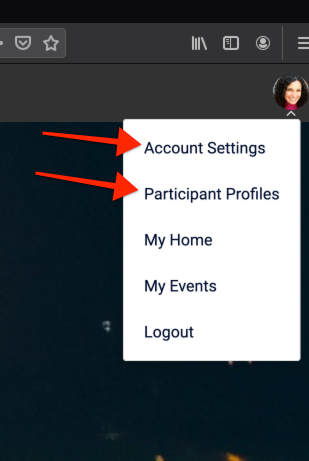
If your photo is blank on the roster, you need to ensure a photo is uploaded in both places.
If you do not see a Participant Profiles link, that means you do not have a participant profile linked to your account. This is valid, as you only need to have a user account in order to be assigned to a squad.